First adopter and expert of ProtoPie, drove cross-org adoption and knowledge sharing.
Upskilled 10+ designers through 1:1 coaching.
Pushed the tool's limits and directly shaped ProtoPie's product roadmap through user interviews & feature advocacy.
02 The Challenge
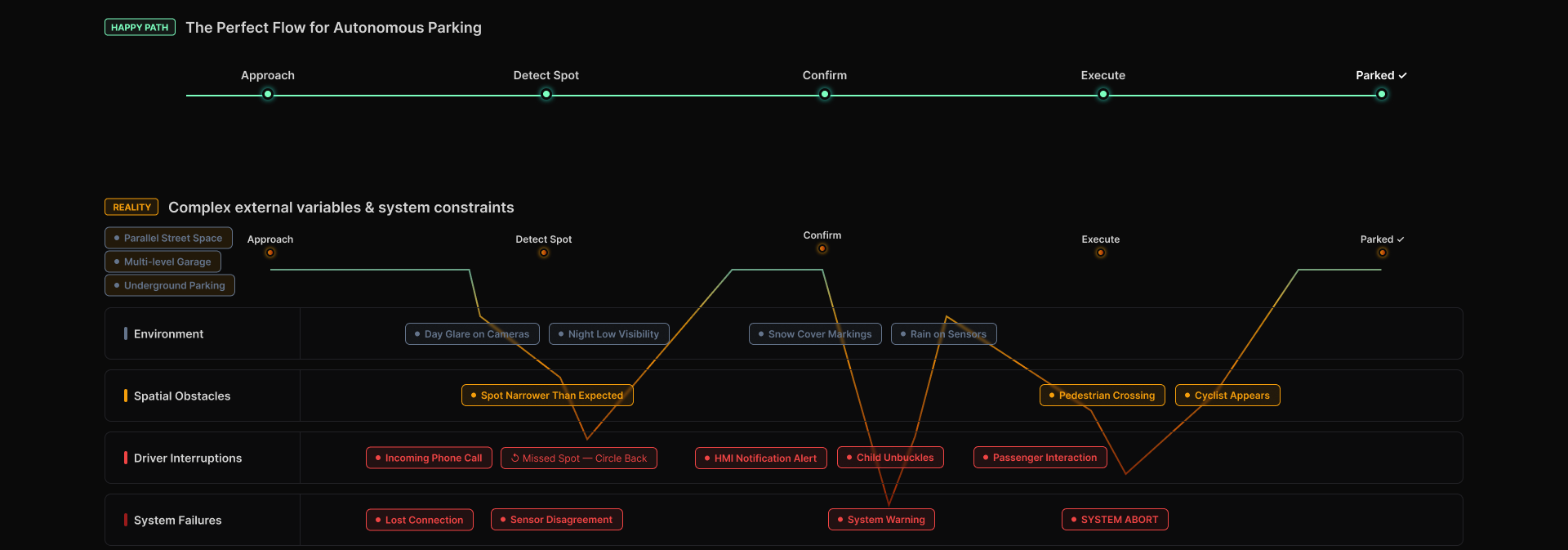
A vehicle is not a happy path
Designers create in-vehicle experiences in tools like Figma. But a vehicle is a highly
complex system, shaped continuously by environmental factors and the state of the car
itself. Testing a design as a happy path is not enough to know whether it will hold up
as a real product for edge cases.
Real-world variables across environment, obstacles, driver interruptions, and system
failures constantly divert the flow away from the happy path.
The gap
No unified tool for designers to build dynamic, stateful experiences
No way for researchers to test those experiences credibly
No way for customers to feel the design in conditions close to real
The bet
Rather than accept the gap, my team took the initiative to build a prototyping
platform that integrates design with real vehicle data, running on production vehicles.
03 The Platform
ProtoPie with Data Integrations
We evaluated the available prototyping tools and selected ProtoPie as the main tool and
interface, because it could connect designs to both hardware and live vehicle data.
Around it we built Artemis: a stack that feeds real signals in, translates them, and
drives them out to whatever surface is being tested.
Peripherals & Feeders
Where signals and inputs come from
Emulator
Dispatcher
Horizon Control
MMC Service
LLM Agent
Artemis Core Stack
Where design meets the signal layer
ProtoPie UI
Connect API
VISS Bridge
VSS-Server
subscription manager
VSS-fnvx
Vehicle CAN
Consumers & Clients
Where the experience is actually felt
Production vehicle
Michigan Buck
Oasis / Unreal
IO Buck
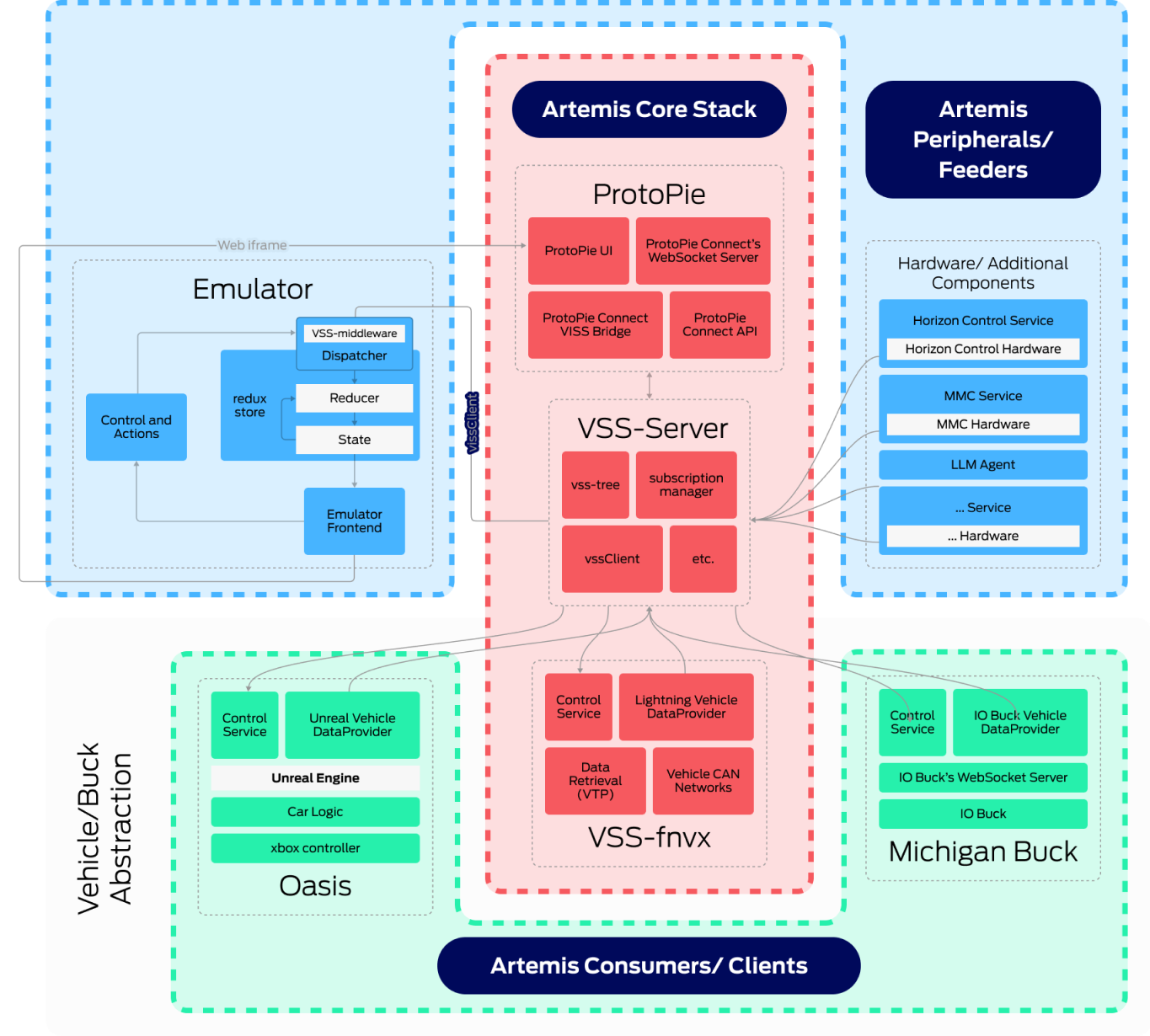
The full architecture. The design tool is not bolted on at the end, it sits inside the
data stack as a first-class client of live vehicle signals.
04 The Workflow
From design file to moving vehicle
The platform only mattered if a designer could actually get something into a car. I
designed the complete workflow end to end, so that a change made in a design file could
travel all the way to hardware without being rebuilt by hand at every step.
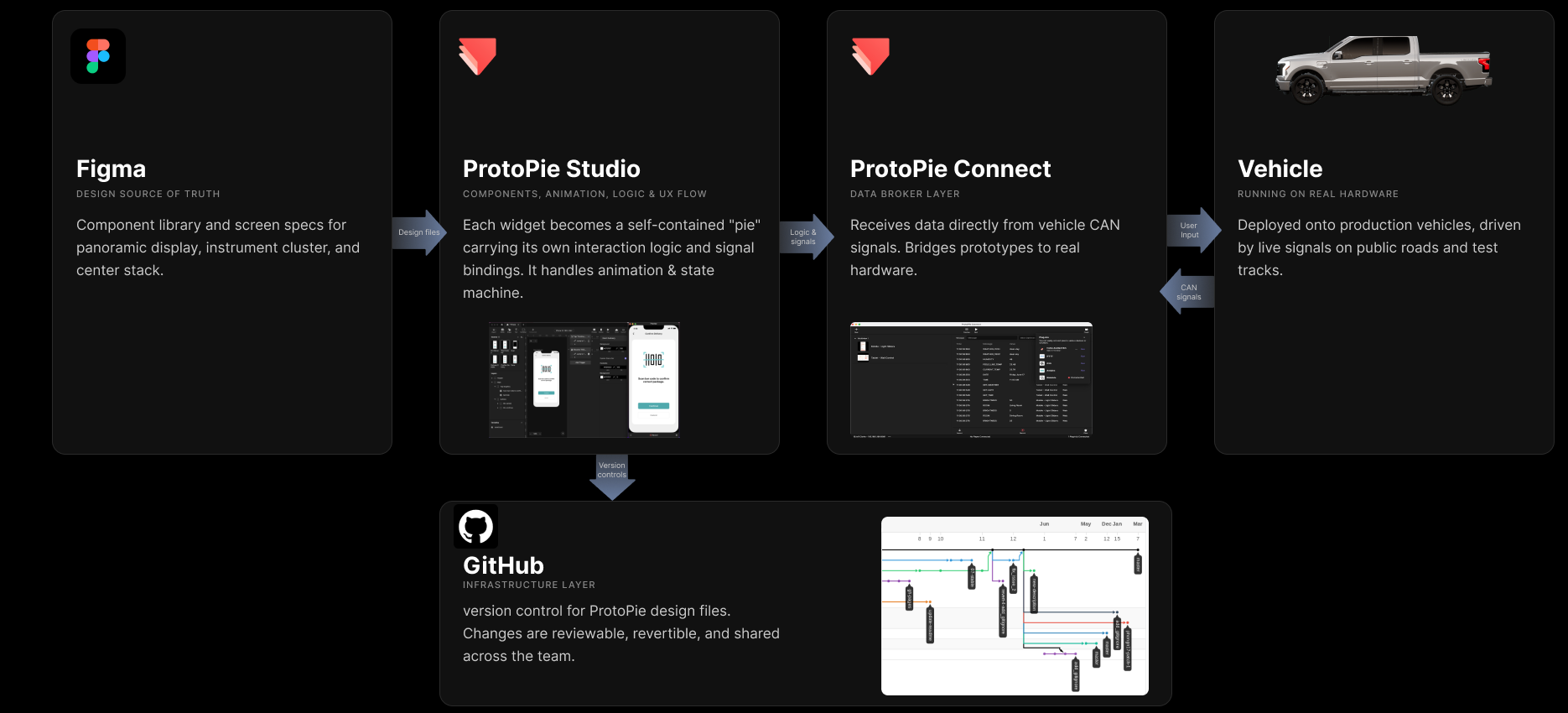
Design files flow from Figma into ProtoPie Studio, which branches into GitHub for
version control and passes logic and signals to ProtoPie Connect, the data broker
that bridges the prototype to the vehicle over CAN signals.
Why it held up
Versioning prototypes in GitHub meant the team could review, revert, and branch a
prototype the way engineers already worked, instead of passing around files.
What it unlocked
Panoramic display, instrument cluster, and center stack designs all integrated into
real vehicles through the same path.
05 Modular by Design
Many pies, one experience
The hardest structural problem was collaboration: prototyping tools assume a single
author, but a full in-vehicle experience is far too large for one person to build alone.
Issues
ProtoPie is not optimized for design collaboration on complex systems
A full integrated experience is far too large for one person to prototype
Too many components, widgets, and logic interplaying across multi-screens made it hard to debug and iterate
Solutions
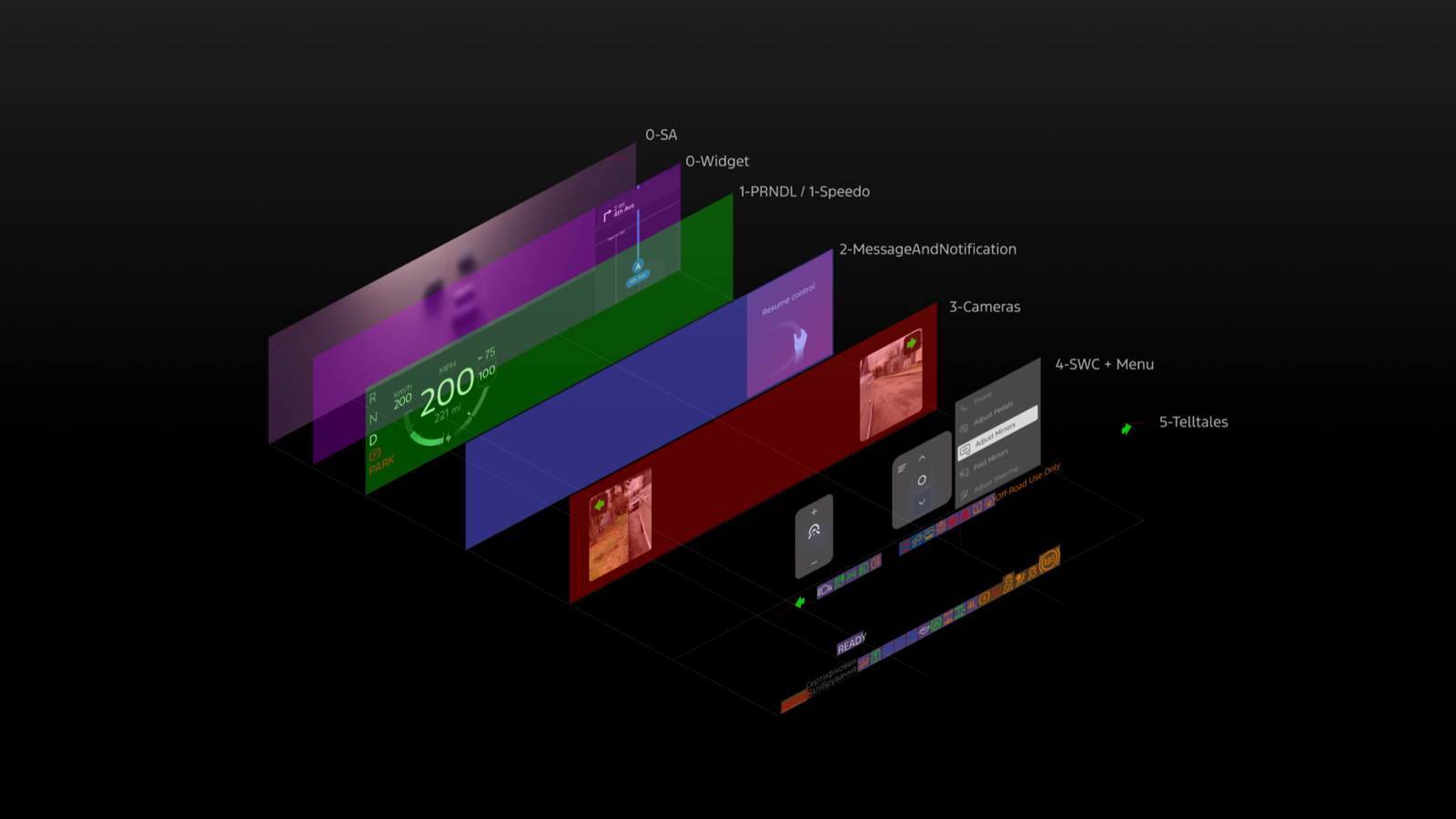
Broke the design system into independent layers, each self-contained in its own .pie file with its own state and logic
A web override orchestrated many pies into one seamless experience
Independent authorship, single integrated result. Designers could work on separate
widgets in parallel without colliding, and the pieces still assembled into one experience.
The cluster broken apart layer by layer. Each plane is an independently authored pie,
stacked and orchestrated at runtime into the single display a driver sees.
Individual components link with live data
Each pie could be directly driven by real, live-integrated vehicle data rather than a
mocked state. A sample of the individual components running on their own:
PRNDL
Speedo
Menu
Camera
Steering Controls
Drive State
Charge State
Incoming Call
The orchestrated view: a control panel with a live data simulator drives every pie at
once, the same way real vehicle signals would.
Component framework
Each component owns its logic and is reusable across projects, so updating one does
not disturb the core.
Result
A prototype system that stayed fast and flexible as it grew, instead of becoming a
single fragile file.
06 The Signal Contract
Making data designable
For a designer to build against live data, the data has to be legible to a designer. I
defined a shared specification mapping each vehicle signal to its value range, its type,
and the interface element it drives. This became the contract between design and
engineering, and the thing that let a prototype behave correctly in a moving car.
A representative slice of the specification. Every element on screen traces back to a
named signal with a defined range.
07 Mentorship & Best Practice
Onboarding & best practice
As more designers started building on the platform, quality couldn't depend on tribal
knowledge. I documented the conventions and built onboarding materials so anyone could
pick up ProtoPie and contribute cleanly from day one.
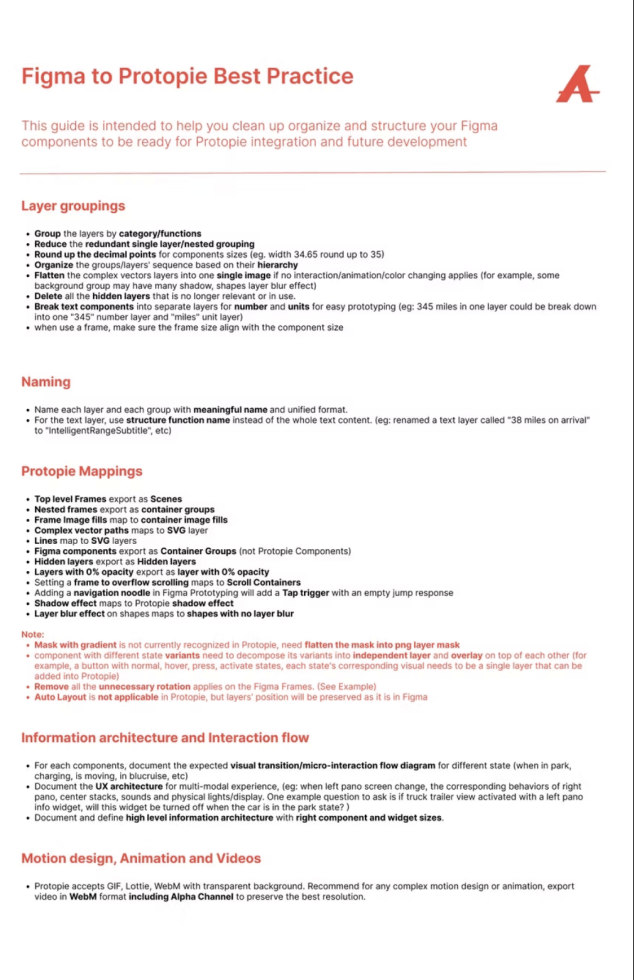
Figma naming & groupings
Layer, group, and frame conventions that keep files predictable and ready for ProtoPie handoff.
ProtoPie system design best practice
How Figma constructs map to ProtoPie objects, and the patterns that translate cleanly between the two.
Data integration
How to wire a component to a live signal instead of a mocked state.
GitHub setup
Getting a new designer's environment versioned and reviewable from their first commit.
Step-by-step video tutorials
Recorded walkthroughs for the workflows that are hardest to explain in writing alone.
The Figma-to-ProtoPie best practice guide: layer groupings, naming, and the exact mapping rules between the two tools.
08 My Contributions
What I owned
This was a team effort, and my part was to make the platform usable as a design practice:
the architecture of the prototypes, the workflow connecting the tools, and the
relationships that kept both improving.
01Systems thinking
Pushing the tool past its intended use
I established best practices for using ProtoPie in automotive prototyping and developed a modular component framework where each component carries its own logic and is reusable across projects. The system stayed fast and flexible, and components could be updated without disrupting core logic.
02Design ops
Designing the end-to-end workflow
I designed the complete path from Figma to ProtoPie, ProtoPie to GitHub, and GitHub to vehicle integration. Before this, there was no route from a design file to something a customer could sit inside and use.
03Cross-functional
Building the bridge with engineering
Working with hardware and software engineers, I broke the design system down into widget elements expressed as “pies.” Using a web override method, we orchestrated many pies into one seamless experience, letting designers work on separate widgets independently while still integrating cleanly.
04Industry partnership
Driving improvements back into the tool
Over two years I worked directly with the ProtoPie product team, sharing insight through real use cases and one-on-one interviews. That continuous feedback influenced tool enhancements, major feature updates, and workflow improvements on their side.
09 Impact
Prototypes that met real customers
7
Research clinics
Run across the United States
1,000+
Miles of road testing
On public roads and test tracks
500+
External participants
Customers experiencing live prototypes
3
Display surfaces
Panoramic, cluster, center stack
We successfully integrated the designs for the panoramic display, instrument cluster, and
center stack into real vehicles through this platform. As the first designer in the
organization to adopt ProtoPie, I built multiple prototypes and became the in-house expert
within a year. From there I set standards for product-ready prototyping, onboarded and
coached fellow designers, and introduced the workflows combining ProtoPie, GitHub, and the
Artemis platform.
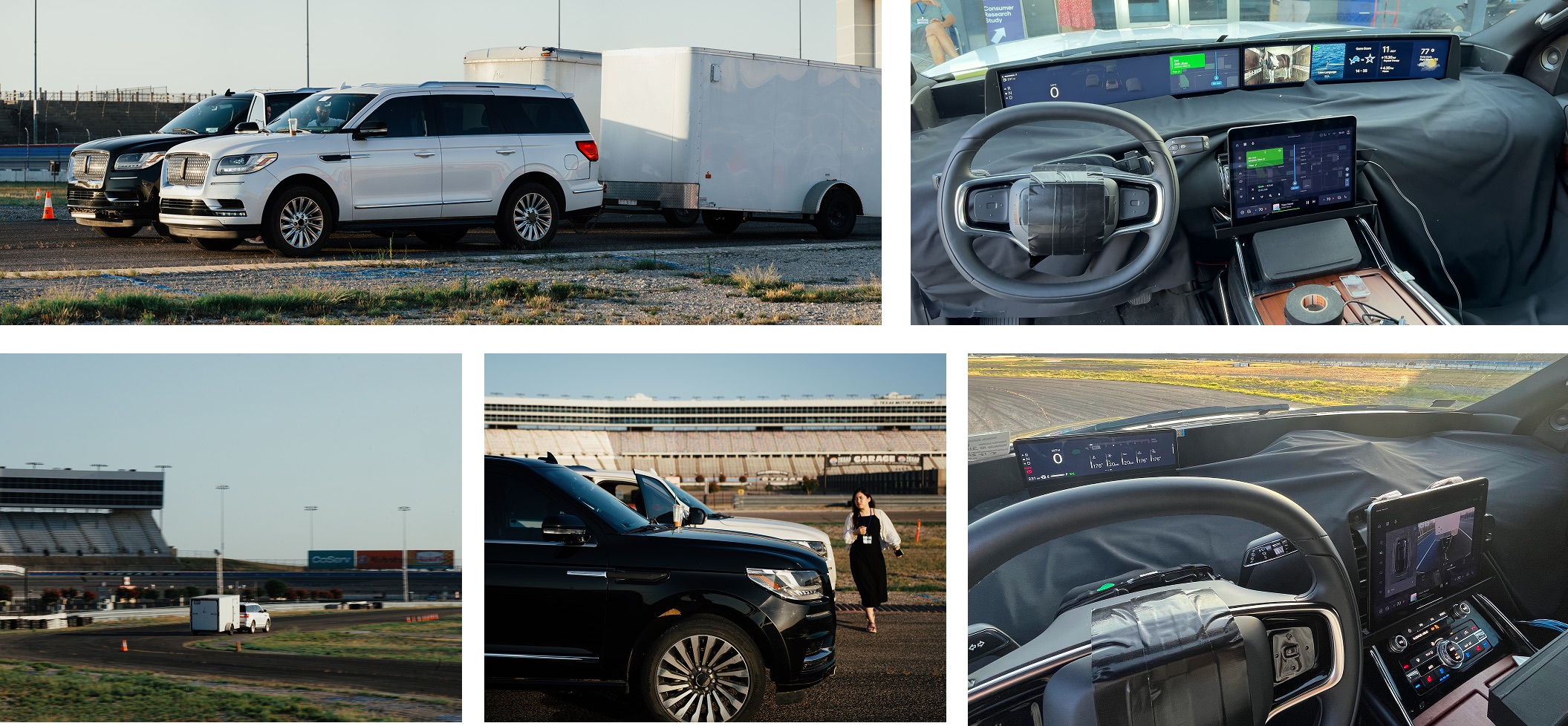
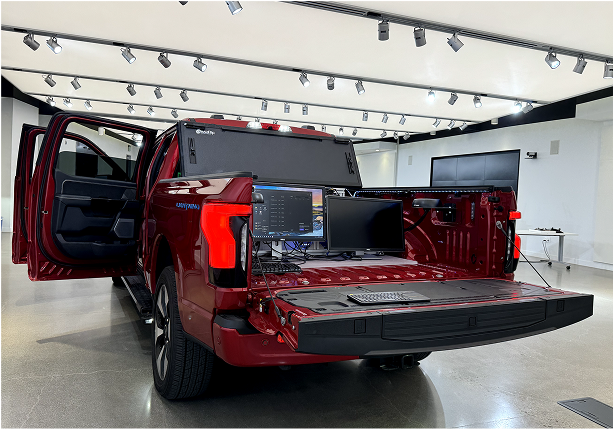
The prototyping rig. A production vehicle becomes the design studio, which is what
made same-day iteration in the field possible.
I was also one of the few designers consistently attending research sessions in person,
supporting studies and witnessing user interactions firsthand. That direct exposure let
me refine designs quickly and validate the approach in real driving conditions.
10 Reflection
What I would carry forward
The lasting lesson is that tooling is design work. The most valuable thing I produced here
was not a screen, it was a path: a repeatable route from a design decision to a customer
sitting in a moving vehicle experiencing it. Once that path existed, the quality of every
design decision downstream improved, because it could finally be tested against reality
instead of argued about in a review.
The second lesson is that pushing a tool beyond its intended use is only worth it if you
feed what you learn back. Two years of working openly with the ProtoPie team turned our
workarounds into product features, which meant the next team did not have to solve the
same problems we did.